
Use the Revenue report to understand how much commerce revenue your business recorded, what share was attributed to Hellotext, and how it is distributed among credited sources.
Open it from the Revenue report card on the Dashboard. Choose a period that matches the business question you want to answer before comparing totals or sources.
How this report counts results
The selected period is based on purchase date. The summary metrics, timeline, revenue breakdowns, and source tables include purchases completed during that period.
Campaign detail uses each event’s date. Some Playbook revenue and conversion metrics group eligible purchases by the credited source-message date. For example:
Campaign message delivered June 30 → Purchase completed July 5 → The delivery counts June 30; the attributed purchase counts July 5 in both Revenue and Campaign detail.
Revenue answers what was purchased during the period; Campaign detail shows that campaign’s events that occurred within it. Check each metric’s date rule before comparing it with Revenue.
A late order correction, cancellation, refund, replacement, or attribution update can change the value assigned to the original purchase date.
Read the summary metrics
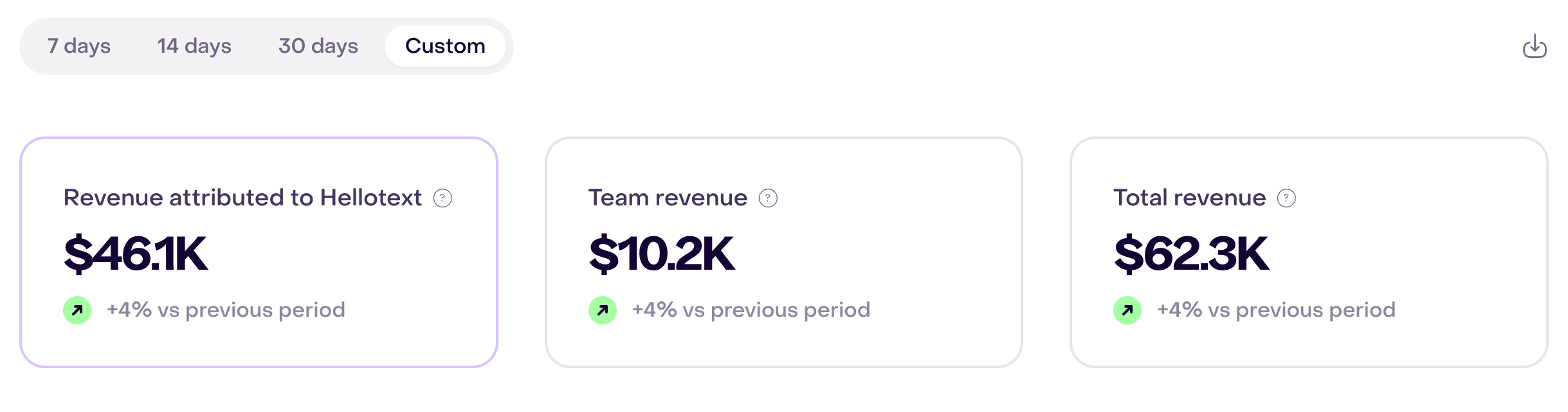
The three summary metrics give related views of revenue:
- Revenue attributed to Hellotext: revenue the attribution engine assigned to Hellotext based on eligible commercial evidence.
- Team revenue: the part of revenue not attributed to Hellotext that is classified as managed by a teammate. It includes eligible legacy teammate-managed revenue without an engine verdict.
- Total revenue: all supported commerce revenue recorded for your business during the selected period, including attributed and unattributed revenue.
Attributed revenue is part of total revenue, and team-managed revenue is part of the remainder. Do not add the three cards together. A support reply or any other team interaction does not automatically make a sale team-managed; Hellotext evaluates the applicable source path and commercial evidence.
Select a metric to update its timeline. Compare the chart only after confirming that the selected metric, period, currency, and breakdown are the same.
In the fictional September 19–25 example, the three cards show $46.1K attributed to Hellotext, $10.2K in team revenue, and $62.3K in total revenue. Each comparison with the previous period is positive; these remain related views, not amounts to add together.
Attributed revenue is not every influenced sale
Hellotext can interact with a customer without receiving attribution for the later purchase.
A purchase receives attribution only when Hellotext has eligible customer, order, source, and timing evidence and no stronger recognized source takes precedence. A purchase outside the applicable window, connected to another profile, or carrying a recognized external source can remain in total revenue without appearing in attributed revenue.
The page title may describe Hellotext’s influence on sales, but influenced revenue is not a separate catch-all metric in this report. Use the attributed metrics for revenue that qualified under Hellotext’s methodology. Attribution also does not prove that the entire amount was incremental growth.
Read Sales attribution for evidence, precedence, windows, team participation, and order adjustments.
Break down the timeline
Use the breakdown control to see where the selected metric came from. Options depend on that metric:
- for Revenue attributed to Hellotext, channel or Playbook;
- for Team revenue, channel, teammate, Playbook, or Campaign;
- for Total revenue, the total timeline without another breakdown.
Choose only the dimensions needed to answer the question. A small row can look unusually strong when the underlying purchase count is low, so review its volume before making a decision.
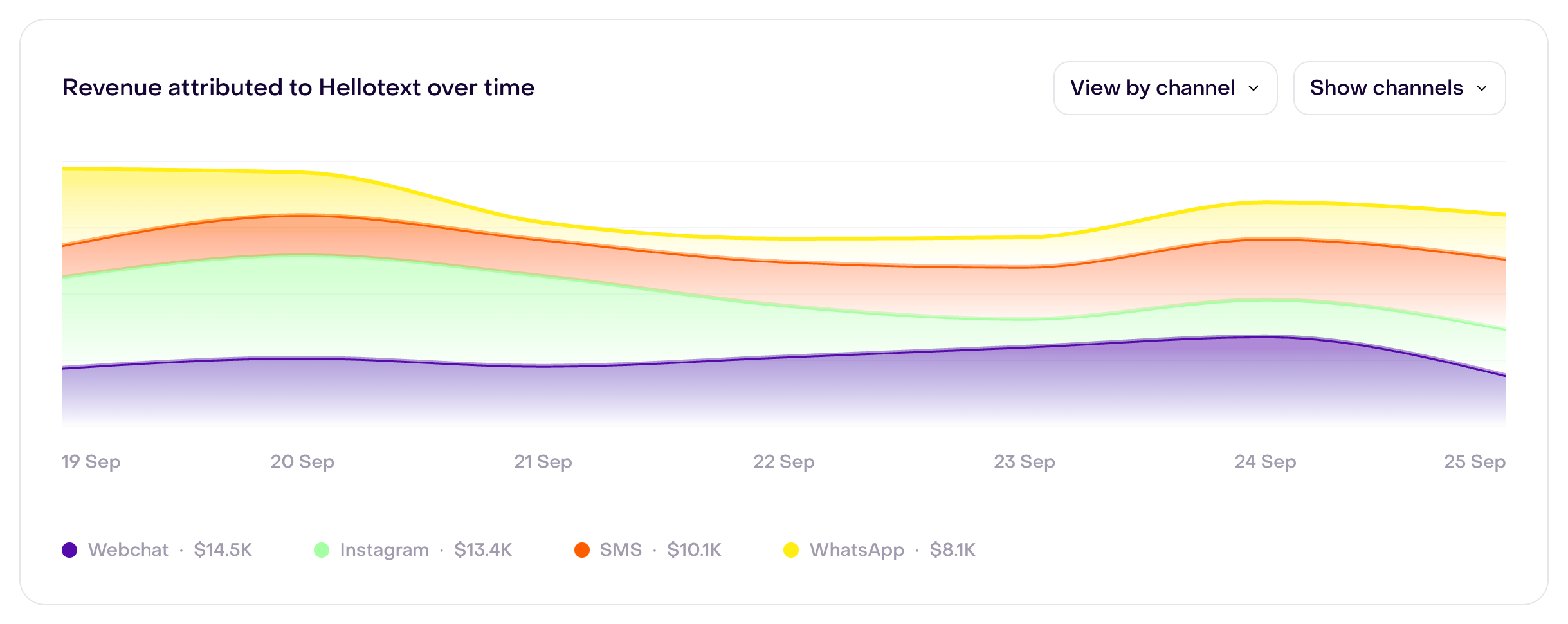
Here, View by channel is selected for revenue attributed to Hellotext. The timeline shows all seven days and separates Webchat, Instagram, SMS, and WhatsApp; values in the legend summarize each channel over the whole period, not a single day.
Read the attributed-revenue widgets
The widgets below the timeline explain the composition of attributed revenue.
- Campaigns and Playbooks compares the attributed amount credited to one-time Campaigns and always-on Playbooks.
- Commerce context shows how that revenue is classified. In the current implementation, supported source rows are grouped under eCommerce; Retail and Marketplace may show no amount.
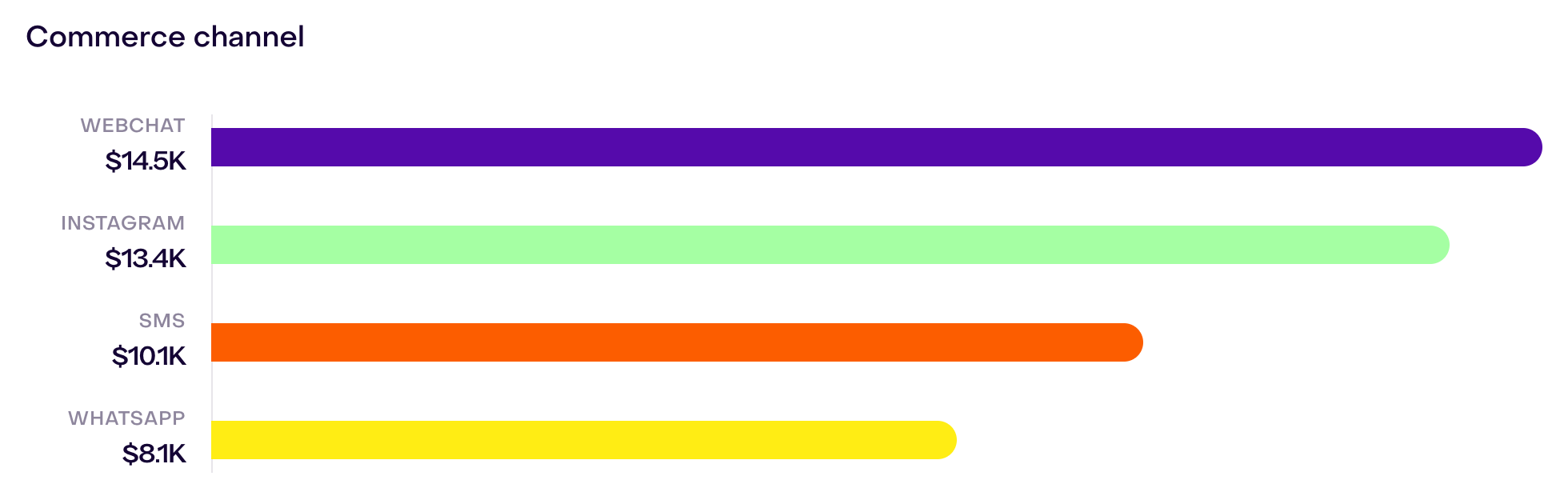
- Commerce channel shows the communication channel associated with attributed purchases, such as WhatsApp or SMS; it does not necessarily identify the store where the sale happened.
These widgets distribute attributed revenue; they do not replace total revenue or add the same purchase to every source that touched the customer.
In this example, Playbooks contribute $28.4K and Campaigns $17.8K to the period’s attributed amount. Displayed amounts are rounded separately, so their sum may differ slightly from the summary card. Commerce context and Commerce channel group that same revenue in other ways, so their bars should not be added to the Playbook and Campaign amounts.

The Commerce channel panel groups that same attributed revenue by communication channel: Webchat $14.5K, Instagram $13.4K, SMS $10.1K, and WhatsApp $8.1K. Compare amounts within this panel; do not add its bars to the Campaigns and Playbooks amounts.
Review source tables
The Playbooks, Campaigns, and Channels sections group the attributed purchases included in the selected period by their credited source.
Use attributed orders, average attributed order value, and attributed revenue to compare the value assigned to each source. A row with no revenue does not necessarily mean that its messages failed to send: it can mean that no purchase completed during the selected period qualified for that source.
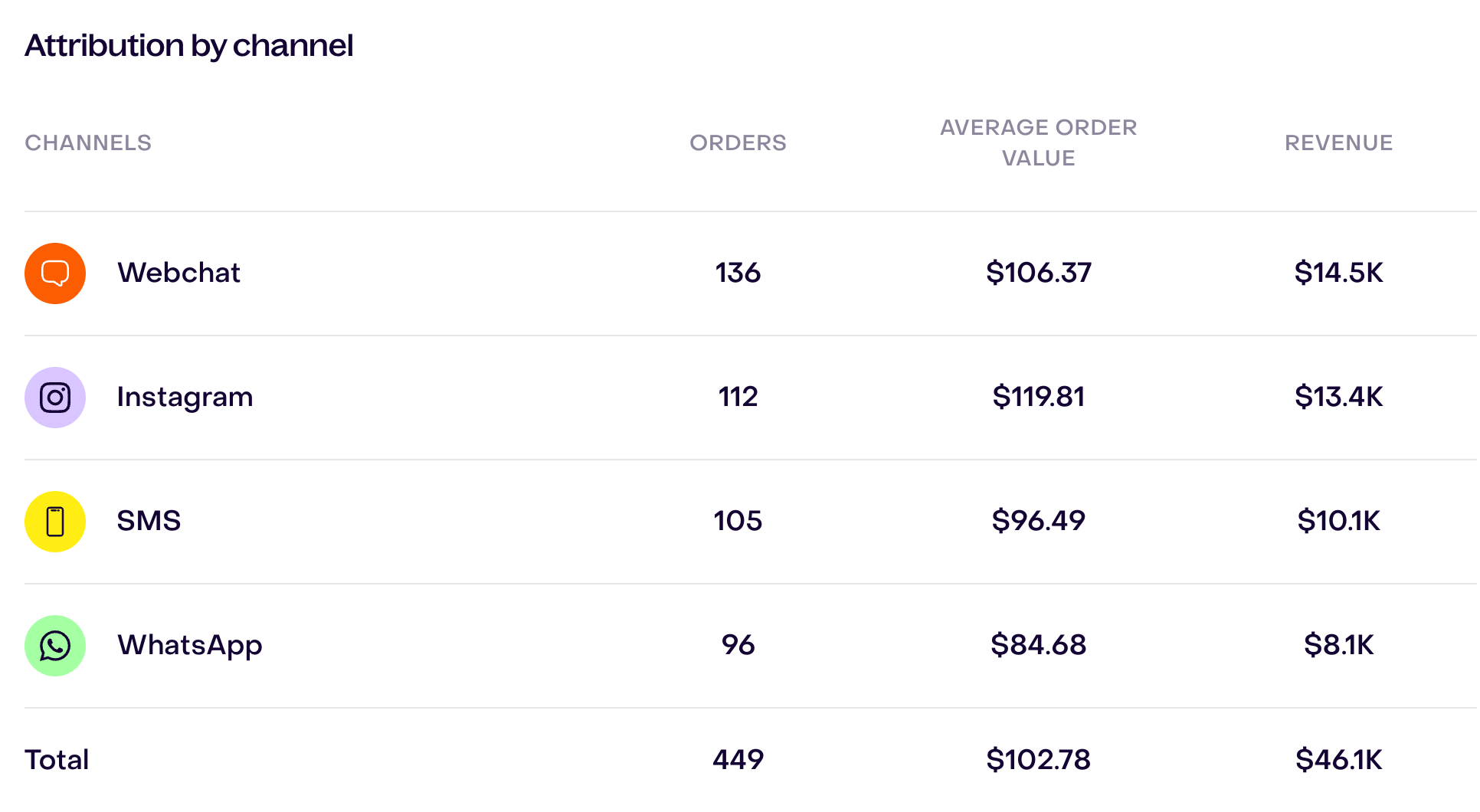
The Attribution by channel table places those three measures beside each channel and shows a total at the end. In the fictional example, Webchat has 136 attributed orders and $14.5K in revenue; the four channels total 449 orders and $46.1K.
For source conversion, ROI, and revenue per message, open the corresponding Campaign or Playbook report; check each metric’s date basis before comparing it with Revenue.
Export and inspect attributed purchases
Use Export when you need order-level reconciliation or the evidence behind attributed rows. The export can include:
- order, customer, and conversation references;
- credited Campaign, Playbook, and channel;
- attributed amount and purchase timestamp;
- attribution type and reason;
- AI and human commercial evidence, when applicable;
- conversation state, commercial driver, and a plain-language explanation; and
- a link to relevant event or conversation context.
The export is prepared in the background. Hellotext downloads it when ready and can also email a completion notice.
When a number looks wrong
Before contacting Support:
- Confirm that both systems use the purchase date, timezone, currency, and order-status rules you expect.
- Compare individual order references before comparing totals.
- Separate missing total revenue from missing attribution.
- Confirm that the purchase and source activity belong to the same customer profile.
- Check cancellations, refunds, replacement orders, and recognized external sources.
- Generate an export to inspect the credited source and explanation.
For a complete investigation, follow Data completeness and reporting gaps.